
그라디언트 툴 (Gradient Tool)
UModeler X 2D 페인팅 에디터에서 텍스처를 부드러운 색 전환으로 채우는 그라디언트 툴입니다. 그라디언트 필드에서 시작·중간·끝 색을 편집하고 G 키로 선택해 드래그로 방향을 정합니다 — 배경과 빛/그림자 블로킹에 사용합니다.
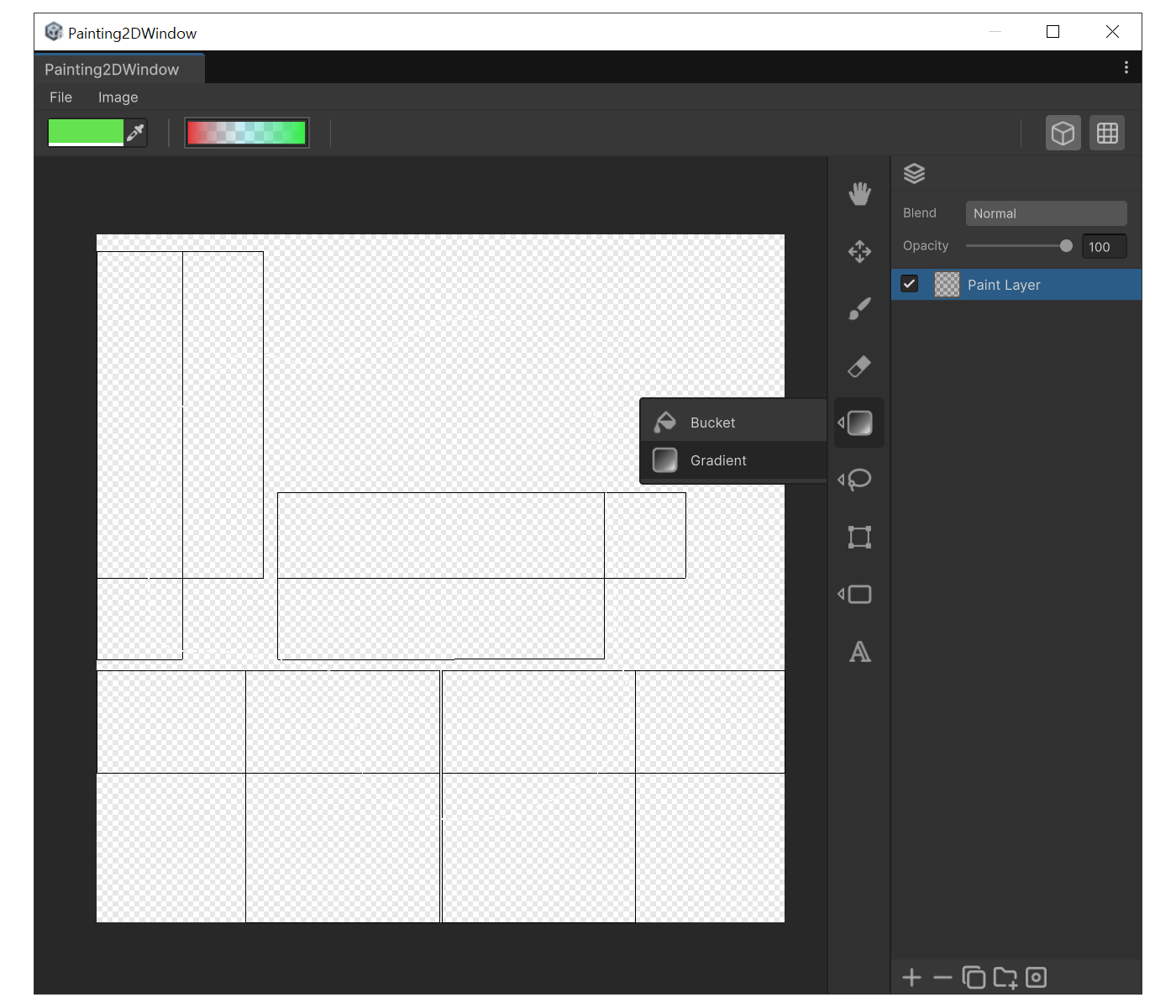
용도
- 배경을 부드러운 색 전환으로 채울 때
- 빛/그림자 방향을 잡기 위해 단조로운 변화를 깔 때
속성
- 그라디언트 필드 : 시작색·중간색·끝색과 위치(컬러 스톱)를 편집합니다. Unity의 GradientField와 동일합니다.
사용법
- `G`로 Gradient를 선택합니다.
- 상단 그라디언트 필드를 눌러 원하는 컬러 스톱을 구성합니다.
- 캔버스에서 드래그합니다. 드래그 시작점이 그라디언트의 시작, 놓은 지점이 끝입니다.
- 선택 영역이 있으면 선택 범위 안에만 채워집니다.