
Text to 3D
Text to 3D enables you to create 3D models by simply entering a text description of what you want to generate.
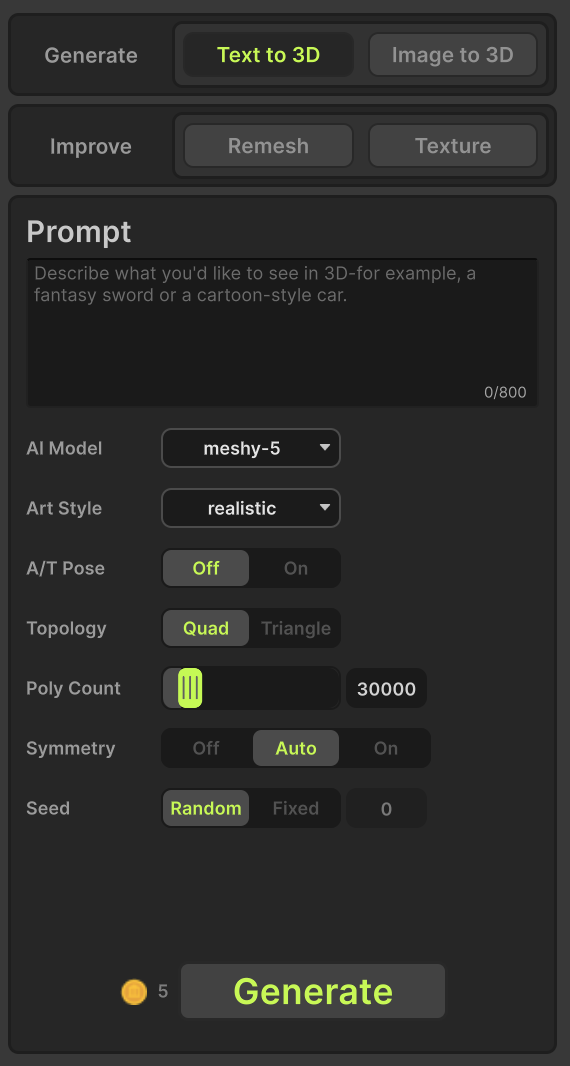
Prompte
Enter a text description of the 3D model you want to create in this field.
AI Model
Select one model from the list below.
- meshy-4
- meshy-5
- meshy-6
Art Style
Specify the desired art style for the generated object.
- realistic
- sculpture
- low-poly
- cartoon
- pbr
A/T Pose
Whether to generate the model in an A/T pose.
- Off
- On
Topology
Specify the topology of the generated model.
- Quad : Generate a quad-dominant mesh.
- Triangle: Generate a decimated triangle mesh.
PBR Maps
Generate PBR Maps (metallic, roughness, normal) in addition to the base color.
- Off
- On
Poly Count
Specify the target number of polygons in the generated model. The actual number of polygons may deviate from the target depending on the complexity of the geometry.
- 100 to 300,000
Symmetry
Specify the symmetry mode used during the model generation process.
- Off : Disables symmetry.
- Auto : Automatically determines and applies symmetry based on input geometry.
- On : Enforces symmetry during generation.
Seed
The seed determines the randomness used during generation. Using the same prompt and seed will generally produce the same result. However, due to software or hardware updates, the same seed may occasionally generate slightly different results.
- Random : The seed changes automatically each time you generate a model, producing different results for every generation.
- Fixed : The seed remains constant based on the value you enter, allowing you to reproduce the same result consistently.
Generate
Generate the 3D model based on the specified settings.