
Preview
Preview allows you to inspect the generated 3D model with various display modes and lighting options. Use this section to check the model’s appearance and polygon details before exporting.
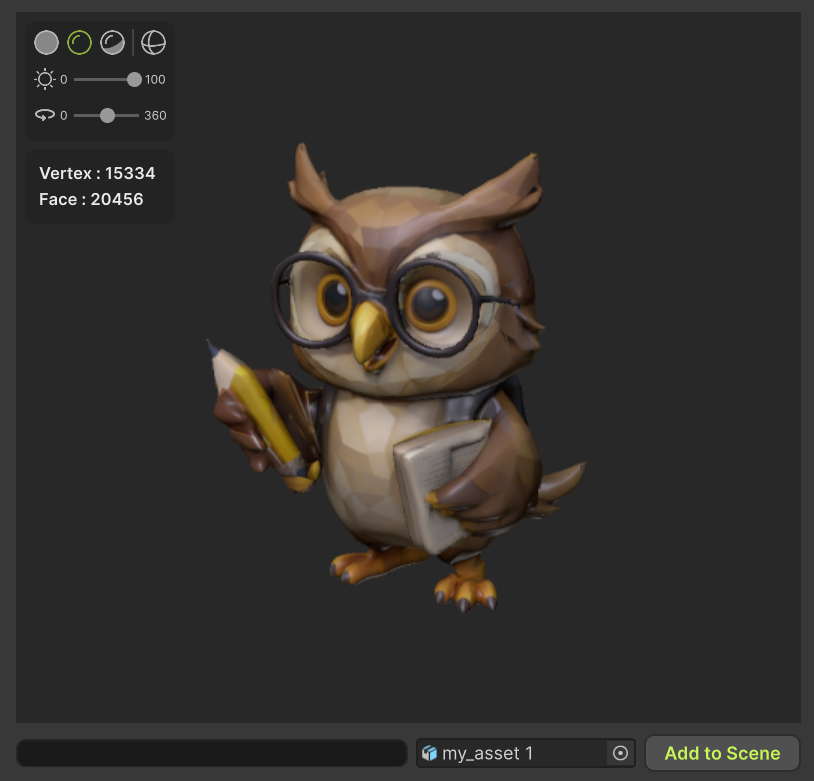
Draw Mode
Select how the 3D model is displayed in the viewport.
- Solid Color - Display the model with a flat, uniform color.
- Base Color - Display the model with its base texture color.
- PBR - Display the model with physically based rendering for realistic materials.
- Wireframe - Display the mesh structure of the model.
Light
Adjust the lighting used in the preview scene.
- Intensity (0~100) - Controls the brightness of the light source.
- Rotation (0~360) - Adjusts the direction of the light around the model.
PolyCount
Display information about the polygon structure of the 3D model.
- Vertex - Shows the total number of vertices in the model.
- Faces - Shows the total number of polygonal faces in the model.
Add to Scene
Adds the model displayed in the Preview to the Unity scene.