
그룹 레이어
Group 레이어는 여러 레이어를 함께 관리하는 컨테이너 레이어입니다.
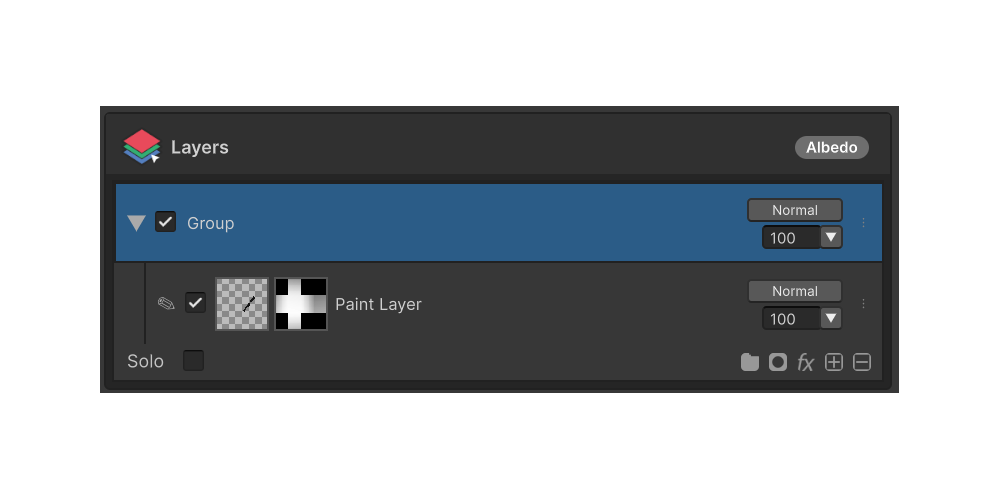
Group 레이어 는 여러 레이어를 묶어 하나의 단위로 관리하는 컨테이너 레이어입니다. 그룹의 가시성·블렌딩·Opacity·마스크가 내부 모든 자식 레이어에 일괄 적용됩니다.
사용 방법
- 레이어 패널 하단 상태바의 Group 버튼 을 클릭합니다.
- 컨텍스트 메뉴에서 Add Group 을 선택합니다.
- 현재 선택 위치에 빈 Group 레이어가 추가됩니다. 다른 레이어를 그룹 위로 드래그해 자식으로 넣을 수 있습니다.
메뉴 항목
상태바의 Group 버튼은 다음 항목을 컨텍스트 메뉴로 표시합니다.
Add Group
빈 Group 레이어를 새로 추가합니다. 항상 활성화되어 있습니다.
Ungroup
선택된 Group 레이어를 해제하고 내부 자식 레이어를 한 단계 위로 끌어올립니다. Group 레이어가 선택되었을 때만 활성화됩니다.
Merge Group
Group 내부의 레이어들을 각 자식의 블렌딩·Opacity 가 반영된 단일 Paint 레이어로 병합 합니다. Group 레이어가 선택되었을 때만 활성화됩니다.