
루트 본 설정
유니티 애니메이터는 루트 모션을 지원합니다.
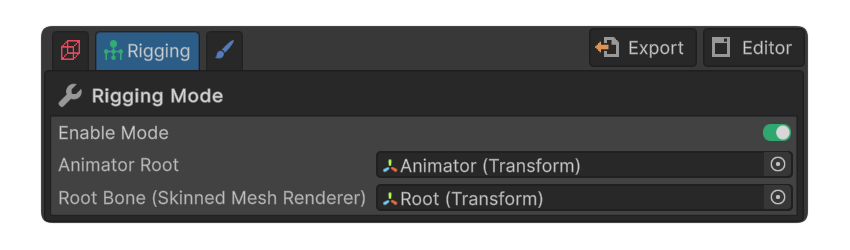
개요
유니티 애니메이터는 루트 모션을 지원합니다.
루트 모션이 적용된 모델은 애니메이션 루트 본의 이동과 회전 정보가 오브젝트의 Transform에 즉시 적용됩니다.
따라서 애니메이션에 따른 모델의 움직임을 별도로 구현할 필요 없이 자연스럽게 반영됩니다.
이를 적용하기 위한 절차를 소개해드립니다.
애니메이터 설정
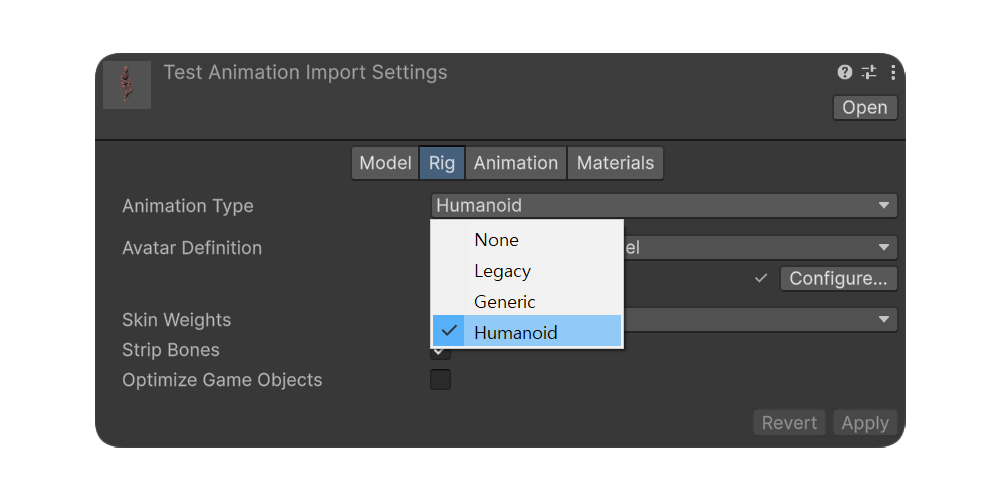
1.사용할 애니메이션을 임포트한 뒤 Humanoid 타입으로 설정합니다.
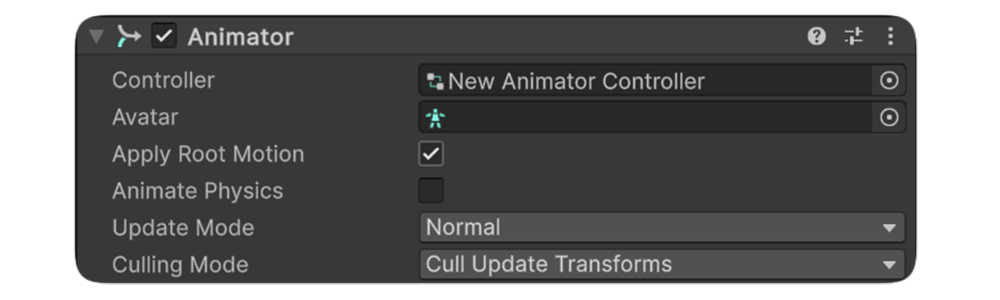
2.애니메이터의 Root Motion을 활성화합니다.
루트 본 설정
1.유모델러의 리깅 모드에 들어갑니다.
2.루트 모션이 적용 될 Root Bone을 적절하게 설정합니다. 일반적으로는 본 구조의 최상단으로 설정됩니다.
3.애니메이션을 재생 시켜 Transform의 변화를 확인합니다. Animator Root를 선택해 확인할 수 있습니다.