
Image to 3D
Image to 3D allows you to generate 3D models directly from reference images.
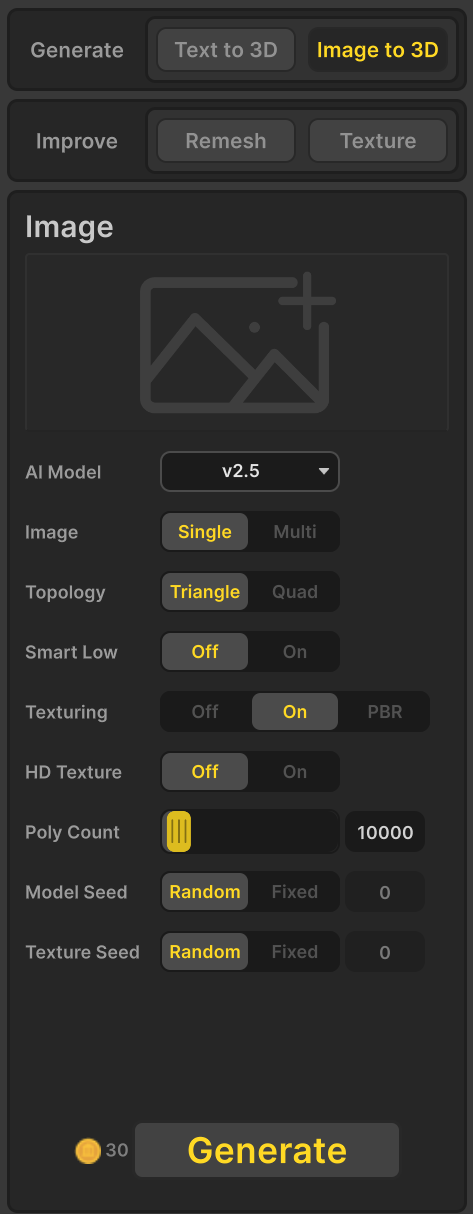
Image
Enter a Image of the 3D model you want to create in this field.
AI Model
Select one model from the list below.
- v3.0
- v2.5
- v2.0
- Turbo-v1.0(Smart Low, Topology, and HD Texture are not supported)
Image
Select how many images to use for generation.
- Single: Use a single image to generate the 3D model.
- Multi:Use four images (front, back, left, and right) to generate the 3D model.
Topology
Specify the topology of the generated model.
- Triangle: Generate a decimated triangle mesh.
- Quad : Generate a quad-dominant mesh.
Smart Low
:Generate low-poly meshes with hand‑crafted topology. Inputs with less complexity work best. There is a possibility of failure for complex models.
- Off
- On
Texturing
Enable or disable texture generation for the 3D model.
- Off
- On
- PBR
HD Texture
When this option is set to On, the texture clarity is improved.
- Off
- On
Poly Count
Specify the target number of polygons in the generated model. The actual number of polygons may deviate from the target depending on the complexity of the geometry.
- 300 to 300,000
Model Seed
The model seed controls the randomness used during 3D model generation. Using the same prompt and model seed will generally produce the same model structure. However, due to software or hardware updates, the same seed may occasionally produce slightly different results.
- Random : The model seed changes automatically each time a model is generated, resulting in different model structures.
- Fixed : The model seed remains constant based on the value you enter, allowing you to consistently reproduce the same model structure.
Texture Seed
The texture seed controls the randomness used during texture generation. Using the same texture seed will generally produce the same texture result. However, due to software or hardware updates, the same seed may occasionally produce slightly different textures.
- Random : The texture seed changes automatically each time textures are generated, producing different texture variations.
- Fixed : The model seed remains constant based on the value you enter, allowing you to consistently reproduce the same model structure.
Generate
Generate the 3D model based on the specified settings.